
GCash is a convenient way to add money to your online bingo account, and I’m pretty sure that each of us, especially those who want to play in the country’s leading online gaming platform has asked this question, “How to deposit in 789Bingo?”
I mean, who wouldn’t want convenience, right? Instead of going through complicated payment procedures, you can just simply select GCash from the deposit methods on your account and follow the instructions displayed.
789Bingo notes that the platform supports GCash as one of the payment methods, along with Maya and QRPh. Today, deposits can be made in the range of ₱500 to ₱50,000 per transaction, and successful deposits are usually credited in 1 – 15 minutes.
In this blog post, allow me to show you how you can deposit in 789Bingo using GCash. I’ll also give you an insight into how you can deposit money in your GCash wallet as well as how you can move money from PayPal to GCash before making your deposit.
How to deposit in 789Bingo using GCash?
When making your deposit on our platform, the first thing you have to consider is having enough money in your GCash account, especially the amount that you intend to deposit. For your safety you should also use your own verified account and review the payment information available before approving any transaction. This minimizes the risk of losing money in the process.
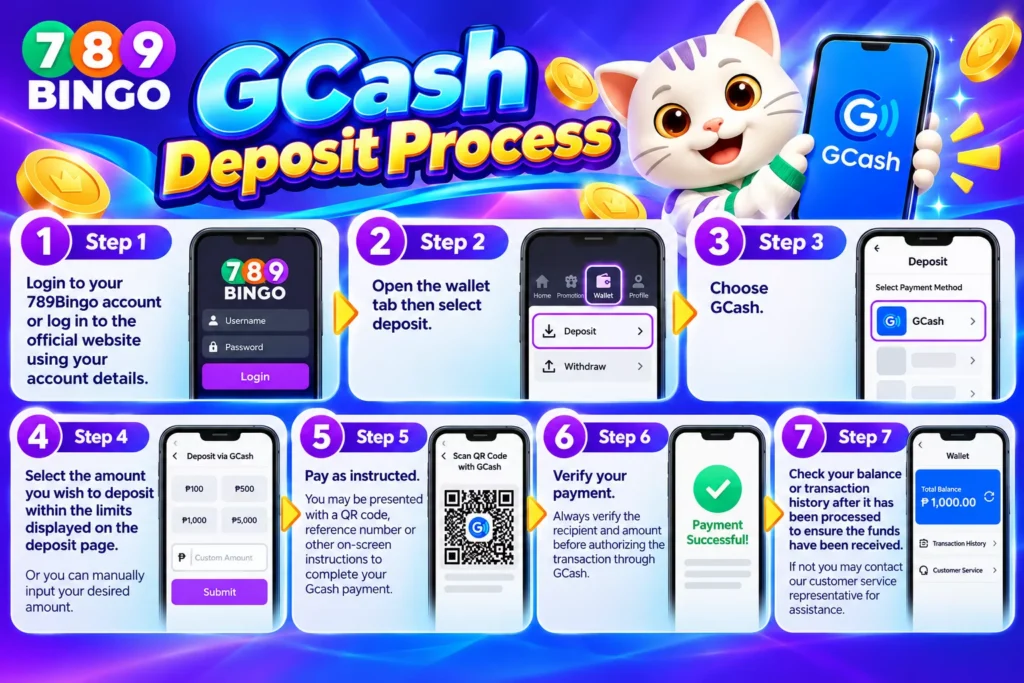
GCash deposit process
Step 1
Login to your 789Bingo account or log in to the official website using your account details.
Step 2
Open the wallet tab then select deposit.
Step 3
Choose GCash.
Step 4
Select the amount you wish to deposit within the limits displayed on the deposit page. Or you can manually input your desired amount.
Step 5
Pay as instructed. You may be presented with a QR code, reference number or other on-screen instructions to complete your Gcash payment.
Step 6
Verify your payment. Always verify the recipient and amount before authorizing the transaction through GCash.
Step 7
Check your balance or transaction history after it has been processed to ensure the funds have been received. If not you may contact our customer service representative for assistance.
For your convenience, you can also watch this video tutorial on how you can deposit in 789Bingo.
An important reminder, 789bingo currently offers deposit amounts ranging from 500 pesos up to 50,000 pesos PER TRANSACTION and is usually credited within 1-15 minutes. If the time range has been reached and your money is still not credited, verify your deposit immediately.
Furthermore, if it’s your first time to deposit on our platform, the minimum initial deposit is 500 pesos. Once the amount has been credited, make sure to set betting limits in order to avoid going beyond your gaming budget.
How to Cash-in your GCash account
Well, it’s obvious that you cannot deposit credits into your 789Bingo account if you don’t have any balance on your GCash account.
There are different ways to fund a GCash wallet. Depending on the services available to you, you may be able to cash in via supported banks, payment machines, stores, remittance partners and other payment channels.
For example, if you opt for a participating over-the-counter location, you need to provide your GCash-registered mobile number and cash-in amount, pay, and wait for the confirmation. In some places you may be asked to generate a barcode using the GCash app.
If you prefer online banking, you can fund your GCash wallet through supported bank cash-in options or transfer money to GCash through InstaPay or PESONet. The exact steps and fees depend on your bank, so check the current instructions before confirming the transfer.
Always check your GCash balance after cashing in before proceeding to 789Bingo to deposit.
How to transfer PayPal to Gcash
Are you wondering how to transfer PayPal to GCash? It’s easier than you think. If you are using PayPal, you might want to consider moving your money to GCash first because 789Bingo does not use PayPal as an official payment gateway for deposits.
According to updated guides in 2026, you must have a fully verified GCash account before you can make any transfer from PayPal. Another criteria that you must meet is that your account details, including your name, must also match for the transfer to proceed.
If you want to link your PayPal account to your GCash account, you must open GCash and locate Global Banks and Partners, choose PayPal and then you must carefully follow the authorization process and instructions needed to connect your account. Once the accounts have been successfully linked, follow these simple steps.
Step 1
Open your GCash application
Step 2
Choose Cash in
Step 3
Carefully locate Global Banks and Partners and choose PayPal
Step 4
Input the amount that you wish to transfer.
Step 5
Double check the information
Step 6
Wait for the money to be credited in your Gcash wallet.
According to trusted guides, GCash states that PayPal cash-ins are normally processed in real time, although some transactions may take 24–48 hours. It also notes that GCash’s current fee information says that starting March 7, 2026, PayPal cash-ins are charged 1% of the cash-in amount for all amounts.
Always check with GCash and PayPal for the latest fees, limits, eligibility requirements and app menus before completing your transfer, as these can change from time to time.
PayPal to GCash to 789Bingo: How does it work?
If your money is in your PayPal account and you want to play on our online bingo platform, you must transfer it to GCash first. Think of it as a two-way process.
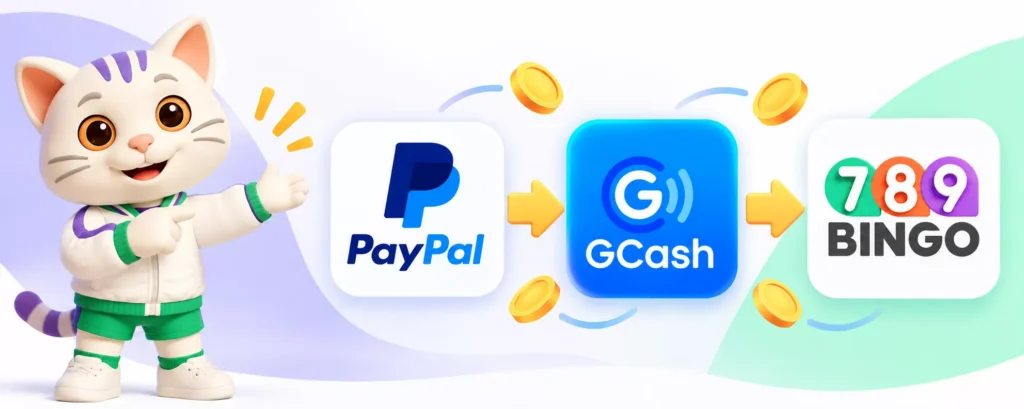
The first thing you must do is transfer your PayPal balance to your GCash wallet. Once the funds are in GCash, you can go back to 789Bingo, access its Deposit section, select GCash and follow the current payment instructions as mentioned above.
Having separate transactions gives you an advantage because it also makes it easier for you to check your records if a payment takes longer than expected.
What to do if your GCash deposit is delayed?
We are done with “How to deposit in 789Bingo using GCash.” Now the question is, what do you need to do if it is delayed?
If your balance hasn’t been updated, don’t get the wrong idea of depositing another deposit transaction with the same amount again. First, check your GCash transaction history if the payment has been processed successfully.
789Bingo clearly states that deposits are formally credited within 1 to 15 minutes and players are usually notified after a successful deposit transaction.
If your payment has been successfully deducted from GCash but is not yet reflected after the expected processing period, keep your transaction reference or receipt and contact the platform’s customer support channel via live chat, viber, or telegram. Explain detailed information based on the transaction only because it will surely help our customer support identify what caused the problem.
789Bingo safety tips when depositing through GCash
Your financial data deserves the same level of security as your account password. Here, we value your safety more than our profit. For deposits, go to the official 789Bingo website, read the payment info carefully, and confirm it. Never reveal your GCash MPIN, OTP, or any other security info to anyone.
You should also retain your transaction receipts until the funds have been successfully credited. As a matter of fact, it’s better to screenshot every transaction for future use. If the payment instructions seem different than what you normally see, double-check them through the platform’s official customer support channel before sending any amount of money.
Deposit, play and enjoy!
Managing your gaming balance with GCash is simple when you learn how to deposit in 789Bingo. It’s easy to open the deposit section and select GCash. Enter the eligible amount, follow the payment instructions shown, and wait for confirmation.
If you want to know how to cash in to GCash, there are several options to fund your wallet first. And if your money is in PayPal, knowing how to transfer PayPal to GCash lets you transfer eligible funds to your GCash wallet first before making a separate 789Bingo deposit.
Whatever way you choose, it is very important to check each transaction, keep your account details safe, and keep your receipts!
Frequently Asked Questions (FAQs)
1. Is it possible to deposit in 789Bingo using GCash?
Yes. GCash is one of the deposit methods currently supported by 789Bingo.
2. What is the minimum GCash deposit on 789Bingo?
Based on the most recent information posted on 789Bingo, the minimum deposit is ₱500 and the maximum deposit is ₱50,000 per transaction.
3. How long does it take for funds to be credited?
Within 15 minutes, but processing times may vary. Please check your transaction status before making another transaction If funds are not credited within the given timeframe. You may contact our 24/7 customer service for support if such inconvenience happens.
4. Can I send money from PayPal to GCash?
Yes, when your accounts satisfy the relevant eligibility and verification criteria and are successfully linked.
5. Can I deposit directly from PayPal to 789bingo?
No, 789Bingo currently has no PayPal in their payment gateways.
Read more: What Is the Best Bingo Casino App in the Philippines in 2026?











Leave a Reply